This guide shows you how to turn on spam filtering for your Net3000 hosted mailbox in webmail. Mail is hosted on the Net3000 Managed Email Server (mailman.net3000.ca). After you enable filtering, messages that MailEnable flags as moderate or high spam risk are moved to your Junk Mail folder instead of your Inbox.
Use this when you want automatic junk sorting without changing settings in Outlook, iPhone Mail, or another email app.
Before you begin
- Have your email address and mailbox password ready — the ones we set up for you on mailman.net3000.ca.
- Log in with your full email address (for example,
you@yourdomain.com), not just the part before the@. - These settings apply to your mailbox only. Each user on the domain configures their own spam filtering in webmail.
Open webmail and sign in
Step 1. In your browser, go to https://mailman.net3000.ca/.
Step 2. Enter your email address and password, then sign in. If this is your first webmail login, you may be asked to choose a new password before you can continue.
Enable spam filtering
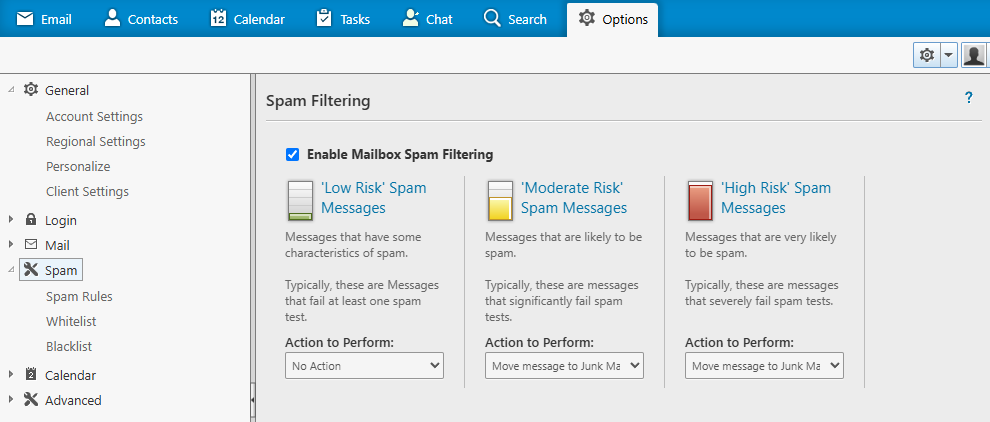
Step 3. In the top menu bar, click Options.
Step 4. In the left sidebar, open Mail, then click Spam.
Step 5. Tick Enable Mailbox Spam Filtering.
Send moderate and high-risk mail to Junk Mail
MailEnable groups suspected spam into three risk levels. For the best balance of protection and fewer false positives, we recommend:
- Low Risk — leave as No Action (or your preference).
- Moderate Risk — set Action to Perform to Move message to Junk Mail folder.
- High Risk — set Action to Perform to Move message to Junk Mail folder.
Step 6. Save your changes. New mail that matches those rules goes to Junk Mail. Check Junk Mail occasionally in webmail or your email app in case a legitimate message was misclassified.
You can read and send mail in a browser at https://mailman.net3000.ca/ at any time. Spam filtering in webmail works alongside Outlook, iPhone Mail, and other clients — filtered messages still land in Junk Mail no matter how you connect.
Need a hand? Open a support ticket from your Net3000 dashboard and we will help you complete the setup.